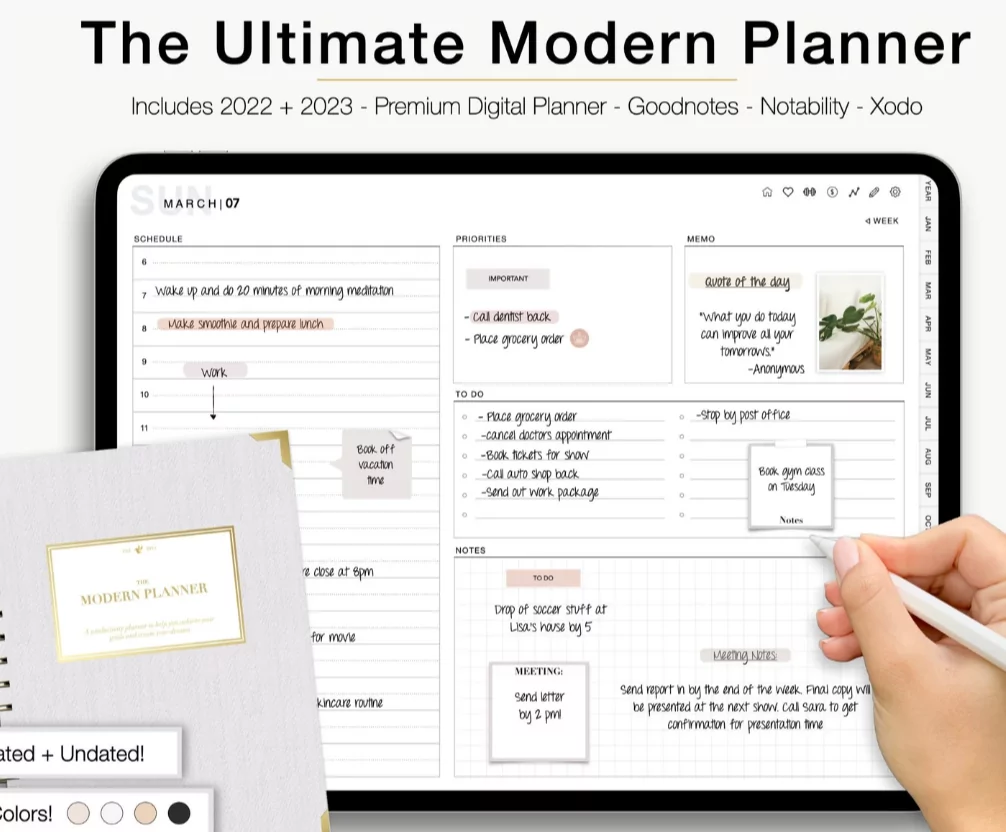
As we navigate through 2026, the shift from traditional paper planners to dynamic digital ecosystems is more pronounced than ever. Digital calendars and planning tools offer unmatched flexibility, allowing you to sync schedules across devices, integrate multimedia, and customize layouts without the waste of physical paper. Whether you are managing complex business projects or personal wellness goals, discovering the best digital calendar templates and tools will revolutionize your time management. This guide explores top digital planning ideas for 2026, highlighting the best free templates and expert tips to maximize your productivity.

The Evolution of Digital Planning in 2026
Digital planning has evolved far beyond simple grid layouts on a screen. In 2026, digital planners are highly interactive, utilizing hyperlink navigation, embedded multimedia, and seamless integrations with external apps. Modern users demand tools that act as a “second brain,” combining calendar scheduling with habit tracking, journaling, and financial planning all in one centralized hub.
This evolution is largely driven by tablet technology and styluses, which replicate the satisfying tactile feel of handwriting while offering the infinite editability of digital software. Note-taking apps like GoodNotes, Notability, and Penly have become the premier platforms for hosting these comprehensive PDF digital planners.

Best Free Digital Calendar Templates for 2026
Finding the right template is crucial to setting up an effective digital system. Fortunately, 2026 offers an incredible array of free templates tailored to different workflows and applications.
Canva: The Customization Powerhouse
Canva remains an exceptional resource for building highly customized digital calendars. They offer a vast library of free templates that range from minimalist weekly layouts to comprehensive monthly dashboards. The beauty of Canva is its drag-and-drop interface, allowing you to easily adjust color palettes, change fonts, and add personal digital stickers. Once customized, you can export your calendar as a PDF to import directly into your favorite note-taking app.
Google Sheets and Docs Templates
For those who prefer a more data-driven, analytical approach to planning, Google Calendar templates built within Google Sheets and Docs are incredibly powerful. Free 2026 annual overview templates are widely available, allowing for long-term strategic planning. These spreadsheet-based calendars are perfect for visualizing deadlines at a glance and tracking project timelines. They are fully customizable and can be easily shared with team members for collaborative planning.
HappyDownloads and NotyStudio PDFs
If you are looking for a complete digital planner experience to use on a tablet, sites like HappyDownloads and NotyStudio offer exceptional free 2026 PDF planners. These planners come pre-hyperlinked, meaning you can tap on a month tab to instantly jump to that section. They typically include monthly, weekly, and daily pages, along with extra notebook sections for freeform writing. These are perfect entry-level templates for anyone new to tablet-based digital planning.

Top Digital Tools and Note-Taking Apps
The template you choose is only as good as the software you use to interact with it. Here are the leading digital tools for organizing your 2026 calendar.
GoodNotes and Notability (iOS)
For iPad users, GoodNotes and Notability are the undisputed champions of digital planning. These apps allow you to import PDF calendar templates and write over them using an Apple Pencil. GoodNotes, in particular, is celebrated for its precise handwriting recognition and organizational folder systems. Many premium and free 2026 planners are specifically optimized for the GoodNotes interface, utilizing hyperlinked tabs for rapid navigation between daily schedules and monthly overviews.
Penly and Xodo (Android)
Android users are not left behind in the digital planning revolution. Penly is a highly recommended app for Android tablets, offering robust PDF annotation features and smooth hyperlink functionality. Xodo is another excellent, versatile PDF reader that works across multiple platforms, ensuring you can access and update your digital calendar whether you are on an Android tablet, a Windows PC, or a smartphone.
Notion: The All-in-One Workspace
For those who prefer typing over handwriting, Notion remains a powerhouse tool in 2026. Notion allows you to build relational databases, meaning your calendar can automatically link to your project boards, to-do lists, and meeting notes. You can find thousands of free Notion calendar templates online, ranging from simple content content planners to complex “Life OS” dashboards. Notion’s true power lies in its ability to toggle between calendar views, Kanban boards, and timeline views with a single click.
Specialized Digital Planning Ideas
A standard calendar often isn’t enough to manage the complexities of modern life. Incorporating specialized digital layouts into your 2026 system ensures comprehensive organization.
Time-Blocking and Productivity Pages
To maximize focus, look for digital templates that feature dedicated time-blocking layouts. These templates break the day down into hourly or half-hourly slots, allowing you to visually allocate time for deep work, meetings, and breaks. Pairing these with “Top 3 Priorities” sections ensures you tackle your most critical tasks first.
Lifestyle and Wellness Trackers
Comprehensive digital planners in 2026 seamlessly blend work and personal life. Many free digital downloads now include lifestyle templates, such as meal planners, fitness trackers, and digital scrapbooks. Having your wellness goals tracked in the same digital notebook as your work schedule promotes a healthier work-life balance and keeps all your personal metrics organized in one place.
Tips for Maximizing Your Digital Calendar
Transitioning to a digital planner requires a slight shift in habits. Follow these tips to ensure your digital system actually boosts your productivity in 2026.
- Utilize Cloud Syncing: Ensure your planning app automatically syncs to the cloud. This guarantees that an appointment you write on your tablet at home is instantly visible on your smartphone when you are running errands.
- Integrate with Apple/Google Calendar: Look for advanced digital PDF planners that feature direct integration with Apple Calendar or Google Calendar. This allows you to tap a time slot in your PDF and automatically create a digital notification on your phone.
- Keep It Decluttered: The infinite space of digital planning can lead to over-scheduling. Use the lasso tool to easily move tasks to the next day instead of crossing them out, keeping your digital pages visually clean and stress-free.
- Use Digital Stickers: Take advantage of digital stickers to create visual cues. Use specific icons for paydays, workouts, or urgent deadlines. This makes scanning your monthly overview much faster and more intuitive.
Embrace the Digital Shift
Upgrading your organizational system with digital calendar tools in 2026 offers unparalleled efficiency and customization. Whether you prefer the tactile feel of writing in a GoodNotes PDF template or the database-driven power of Notion, there is a digital solution that fits your brain perfectly. Take advantage of the numerous free templates available online to experiment with different layouts, and build a digital command center that keeps you focused, organized, and inspired throughout the entire year.
